 Drug Name Normalizer
A client-side web app that normalizes messy medication names to standardized generic names using the NIH RxNorm API. Built with Next.js 15, TypeScript, and TailwindCSS. Solves a real healthcare data problem, converting 2-4 hours of manual drug mapping into a 2-minute automated process.
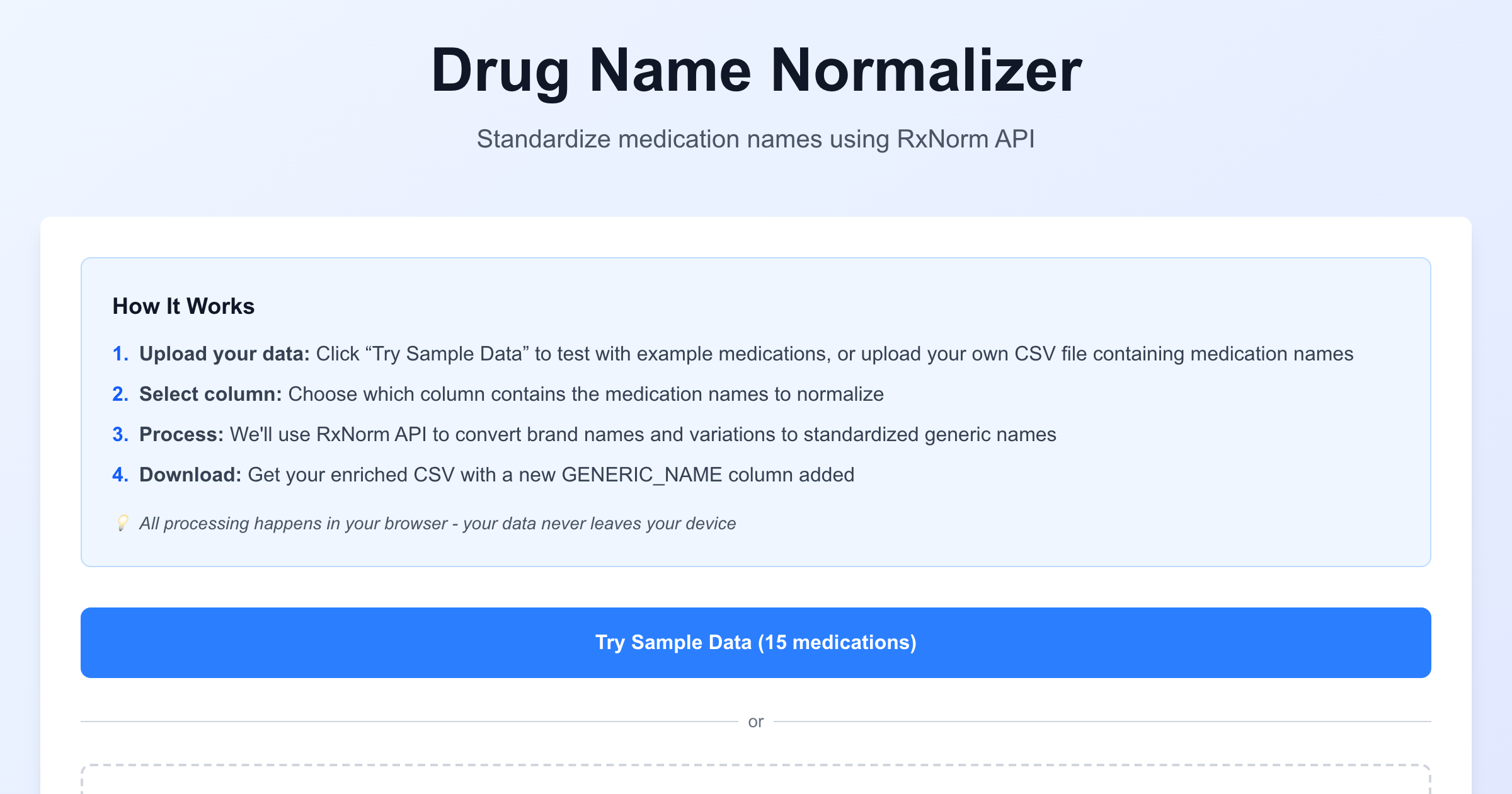

As seen in https://github.com/prahlaadr/drug-normalizer
Live Demo: https://drug-normalizer.vercel.app/
If you've ever worked with healthcare data from multiple sources, you know the pain. Hospital A calls it "Tylenol 500mg". Hospital B uses "acetaminophen 500 mg tablet". Hospital C logs it as "APAP 325mg". The pharmacy system says "Paracetamol".
They're all the same drug. But try telling that to your analytics pipeline.
This is a problem I saw firsthand at TargetRWE working with clinical data normalization. Data engineers would spend 2-4 hours manually mapping medication names before they could even start their analysis. I wanted to see if I could automate that.
The Problem
Healthcare data comes from multiple sources with inconsistent medication naming:
Hospital A: "Tylenol 500mg"
Hospital B: "acetaminophen 500 mg tablet"
Hospital C: "APAP 325mg"
Pharmacy:   "Paracetamol"
Without normalization: Your analysis treats these as 4 different drugs.
With normalization: All map to "acetaminophen", accurate aggregation possible.
Multi-site clinical trials, insurance claims analysis, drug safety surveillance, they all need clean, standardized medication data.
The Solution
Upload a CSV → Select the medication column → Get a new CSV with a GENERIC_NAME column added.
The app uses the NIH's public RxNorm API to do the heavy lifting. It's the same database that powers most healthcare terminology services.
How It Works
Step 1: Upload Your Data
Drag and drop a CSV file, or click "Try Sample Data" to test with realistic Synthea-format patient data.
Step 2: Select the Medication Column
The app tries to auto-detect columns named "MEDICATION_NAME" or "DESCRIPTION", but you can manually select any column.
Step 3: Watch It Process
Real-time progress bar as each drug gets normalized. The API calls happen in your browser, no data ever touches a server.
Step 4: Download Results
Get your original CSV back with a new GENERIC_NAME column added. Drugs that couldn't be matched show "NOT_FOUND".
Why Client-Side Processing?
This was a deliberate architecture decision. Healthcare data is sensitive. By processing everything in the browser:
- Privacy: Your data never leaves your machine (critical for HIPAA)
- No server costs: Vercel just serves static files
- No timeouts: Process as many drugs as you need
- You see real-time progress: No black box waiting
The RxNorm API has CORS enabled (access-control-allow-origin: *), so browser-to-API calls work perfectly.
Testing Results
I ran a stress test with 120 diverse medication name variations:
Success Rate: 85.8% (103/120 drugs normalized)
Processing Time: ~2 minutes for 120 drugs
What Worked Perfectly ✅
Brand → Generic:
- Tylenol → acetaminophen
- Lipitor → atorvastatin
- Plavix → clopidogrel
- Ozempic → semaglutide
Abbreviations:
- APAP → acetaminophen
- HCTZ → hydrochlorothiazide
- AMOX 500 → amoxicillin
Chemical Names:
- metformin hcl 1000mg → metformin
- atorvastatin calcium → atorvastatin
Even Misspellings:
- Ambian → zolpidem (fuzzy matching FTW)
Expected Limitations
Some drugs return NOT_FOUND, mostly edge cases like "Ventolin HFA" (formulation suffix) or "Prilosec OTC" (OTC designation). These are RxNorm database limitations, not app bugs.
The Tech Stack
- Framework: Next.js 15 (App Router)
- Language: TypeScript
- Styling: TailwindCSS
- CSV Processing: PapaParse
- API: RxNorm REST API (NIH)
- Deployment: Vercel
Why These Choices?
Next.js: Perfect for static site deployment on Vercel, and I wanted to practice the App Router.
TypeScript: The type system saved me from several bugs during the CSV parsing logic. Worth the extra verbosity.
Client-side only: No API routes needed. Everything runs in the browser.
For the Curious Developer
The codebase is clean and documented:
drug-normalizer/
├── app/
│   └── page.tsx           # Full UI with workflow management (279 lines)
├── lib/
│   ├── types.ts           # Complete TypeScript type system (213 lines)
│   ├── rxnorm-client.ts   # RxNorm API client with retry logic (379 lines)
│   └── csv-processor.ts   # CSV parsing, validation, generation (482 lines)
├── public/
│   ├── sample-medications.csv
│   └── realistic-sample.csv
└── README.md              # 800+ lines of documentation
The RxNorm client has exponential backoff retry logic and proper timeout handling with AbortController. The CSV processor validates file size (10MB limit), file type (.csv only), and auto-detects medication columns.
Why I Built This
Partly to solve a real problem I saw in healthcare data workflows. Partly as a portfolio piece to demonstrate that I understand both the technical implementation and the business context.
If you're a PM interviewing me, here's the pitch:
"I identified drug name normalization as a critical pain point in healthcare data workflows. Data engineers at multi-site clinical trials spend 2-4 hours manually mapping medication names. This tool reduces that to 2 minutes. The privacy-first architecture (client-side processing) was critical because healthcare data can't just be uploaded to random servers."
What's Next
- Deploy to Vercel (code is ready, just need to push the button)
- Batch API calls for faster processing
- Multi-ingredient support for combination drugs like Vicodin
- Confidence scores to show how strong the RxNorm match is
Built at the intersection of healthcare data and product thinking.